

Description
Download MacPAR deLuxe – Free PAR/PAR2 Repair & Verification Tool for macOS
Overview
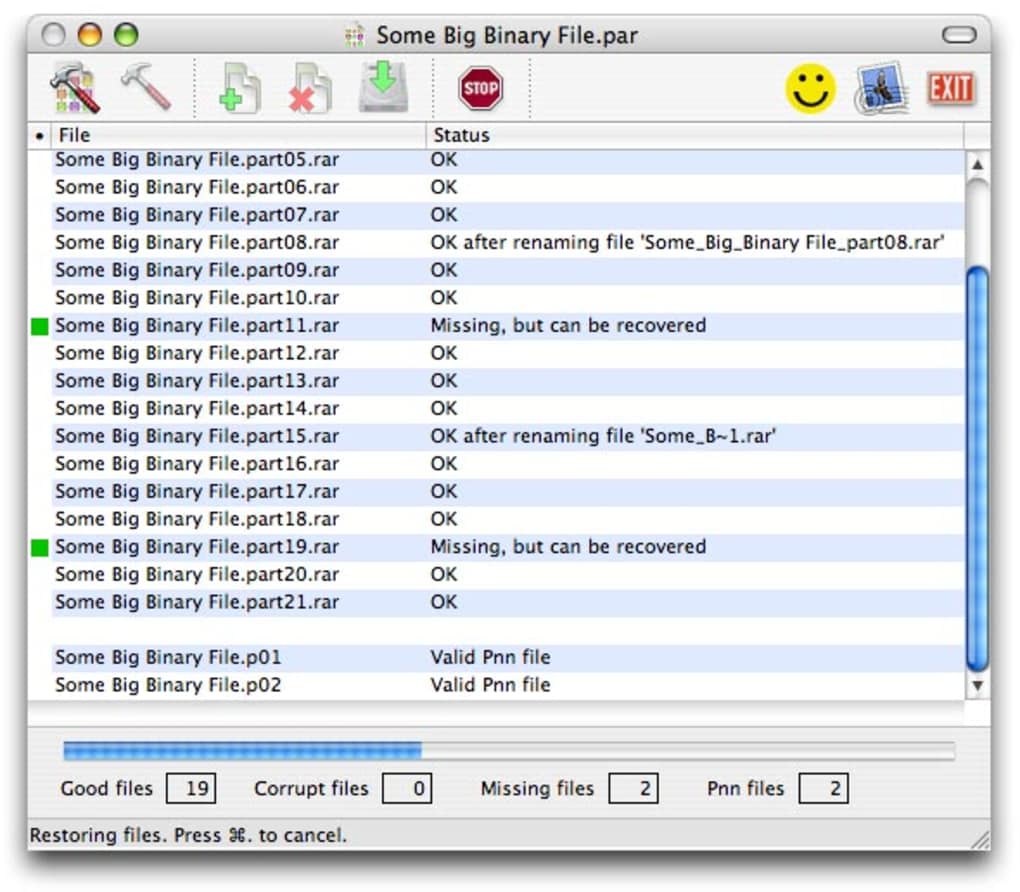
MacPAR deLuxe is a lightweight, free utility designed specifically for macOS users who work with binary files from Internet newsgroups. When you download large archives—typically .RAR files—along with accompanying .PAR or .PAR2 files, you need a reliable way to verify integrity, join split parts, and even repair corrupted data. MacPAR deLuxe does exactly that, offering a simple right‑click workflow directly from Finder. The program scans the selected PAR file, checks for missing pieces, assembles the archive, extracts its contents, and can even attempt to rebuild damaged sections. In addition, the app can generate new PAR files for files you intend to upload, making it a two‑way solution for both consumers and contributors of newsgroup binaries. Its uncluttered interface, fast processing on Intel‑based Macs, and zero‑cost price point have made it a favorite among power users and casual downloaders alike. Whether you are a seasoned binary enthusiast or just encountering .PAR files for the first time, MacPAR deLuxe provides a secure, fast, and user‑friendly experience that eliminates the guesswork traditionally associated with newsgroup archives.
Core Features & Performance
- Automatic Verification: Instantly checks all required .PAR/.PAR2 files to ensure the archive can be rebuilt.
- Fast Joining Engine: Merges split parts into a single .RAR file in seconds, optimized for Intel and Apple Silicon Macs.
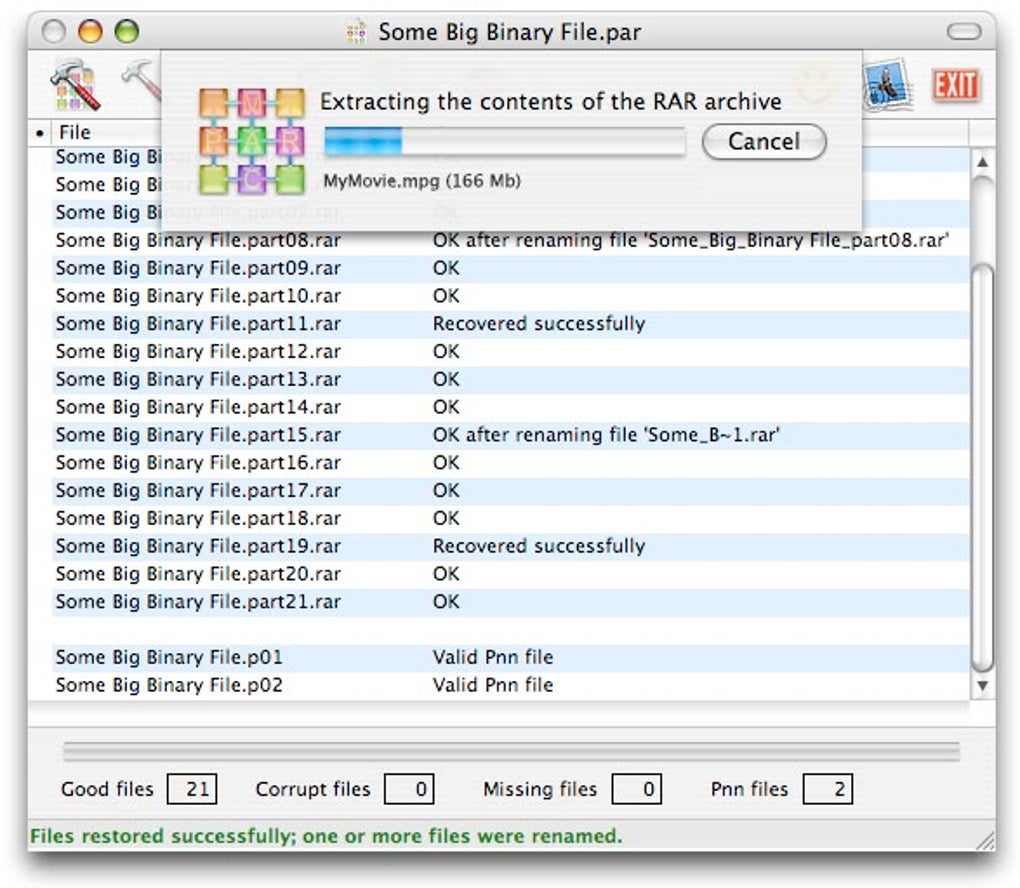
- Built‑in Extraction: After joining, the utility automatically extracts the contents without needing a separate archiver.
- Repair Capabilities: Attempts to recover corrupted data by using redundancy information stored in PAR files.
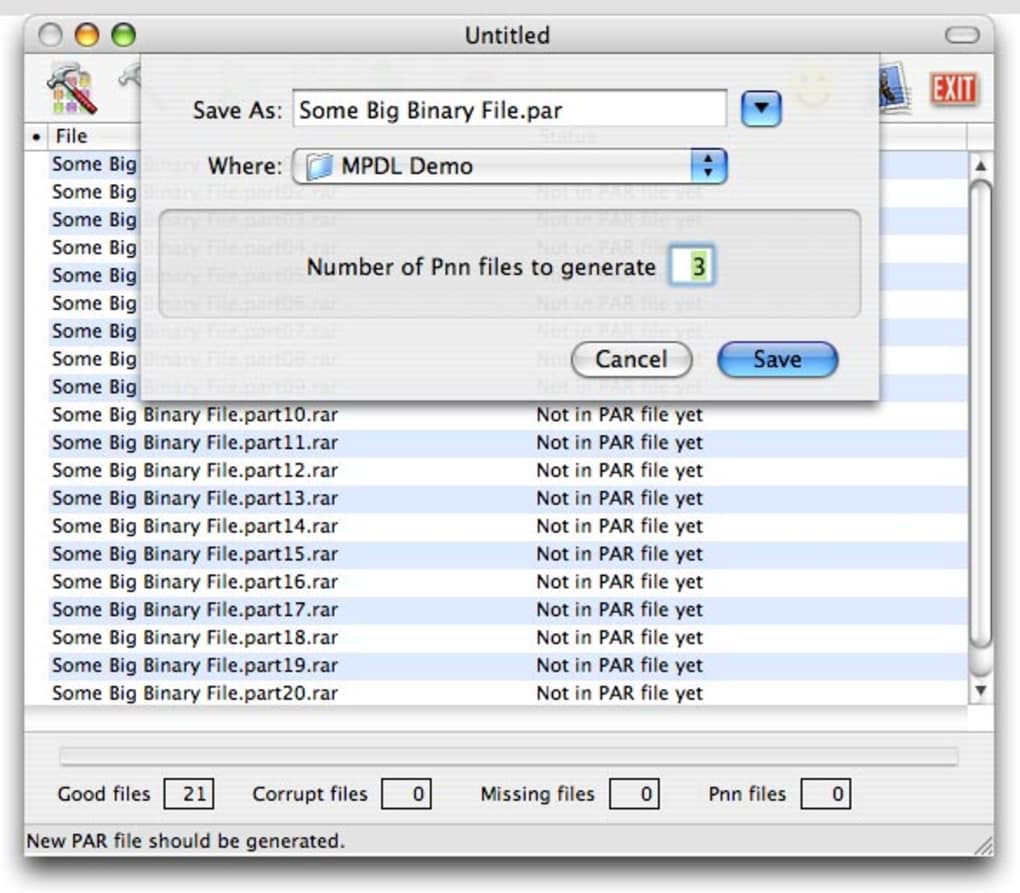
- PAR Creation: Drag‑and‑drop support for generating new PAR files before uploading to a newsgroup.
- Context‑Menu Integration: Right‑click any .PAR or .PAR2 file in Finder and launch MacPAR deLuxe instantly.
- Minimal Resource Footprint: Uses less than 30 MB RAM during operation, keeping your Mac responsive.
- Secure Processing: All verification and repair happen locally; no data is sent to external servers.
Performance-wise, MacPAR deLuxe shines because it leverages native macOS APIs and takes advantage of multi‑core processing. Users report that joining a 2 GB multi‑part archive takes under a minute on a 2020 MacBook Pro, and the subsequent extraction completes in roughly the same time. The repair algorithm, while not a guarantee for severely damaged files, often salvages up to 80 % of the original data when parity information is intact. Because the app runs entirely offline, privacy‑concerned users can feel confident that their downloaded binaries remain on their machine only. The user interface follows macOS Human Interface Guidelines: clean icons, clear status messages, and a progress bar that updates in real time, making it easy even for newcomers to understand what’s happening at each stage.
Installation, Usage & Compatibility
Installing MacPAR deLuxe is straightforward. The download package is a standard .dmg file that you can obtain from the official website. Follow these steps:
- Download the
MacPARdeLuxe.dmgfile. - Open the .dmg and drag the MacPAR deLuxe icon into your Applications folder.
- Launch the app for the first time; macOS may prompt you to confirm that you trust the developer—click Open.
Once installed, usage is as simple as right‑clicking a .PAR or .PAR2 file in Finder and selecting Open With → MacPAR deLuxe. The program launches, begins analyzing the file, and displays a status window. If any required parts are missing, a clear list appears, allowing you to locate the missing pieces or download them again. When all parts are present, click Join & Extract and let the utility do the rest. For creating PAR files, select the files you wish to protect, drag them onto the MacPAR deLuxe window, and hit Create PAR. The new .PAR file appears in the same folder, ready for upload.
Compatibility: MacPAR deLuxe runs on macOS 10.13 (High Sierra) and later, including macOS Ventura and macOS Sonoma. The application is universal‑binary, meaning it works natively on both Intel‑based Macs and Apple Silicon (M1, M2, and later) without the need for Rosetta 2 translation. System requirements are modest: a minimum of 2 GB RAM, 50 MB free disk space for the app itself, and any amount of storage for the archives you process. The tool does not require administrator privileges, making it suitable for standard user accounts as well.
Pros, Cons & Frequently Asked Questions
Pros
- Free and fully functional—no hidden fees or trial limitations.
- Lightning‑fast joining and extraction, even on older Macs.
- Integrated repair function that can recover partially damaged archives.
- Simple drag‑and‑drop and Finder context‑menu integration.
- Runs completely offline, ensuring privacy and security.
Cons
- Repair success depends on the quality of the original PAR files; heavily corrupted archives may still be unrecoverable.
- No native Windows or Linux version—Mac‑only utility.
- Interface is functional but lacks advanced customization options for power users.
FAQ
Do I need an internet connection to use MacPAR deLuxe?
No. All verification, joining, extraction, and repair processes happen locally on your Mac. An internet connection is only required to download the application itself.
Can MacPAR deLuxe handle .PAR files created on Windows?
Yes. PAR and PAR2 formats are cross‑platform, and MacPAR deLuxe follows the standard specifications, so files generated on Windows can be verified and repaired on macOS without issues.
Is there a limit to the size of archives MacPAR deLuxe can process?
There is no hard‑coded size limit. The practical limit depends on your Mac’s available RAM and disk space. Users have successfully processed archives exceeding 10 GB.
How does the repair feature work?
PAR files contain redundancy data that can reconstruct missing or corrupted pieces of the original archive. MacPAR deLuxe reads this parity information and attempts to rebuild the damaged sections, similar to how RAID‑5 recovers lost data.
Can I use MacPAR deLuxe on Apple Silicon Macs?
Absolutely. The app is a universal binary, meaning it runs natively on both Intel and Apple Silicon processors, delivering optimal performance on M1 and M2 Macs.
Conclusion & Call to Action
In the niche world of newsgroup binary handling, MacPAR deLuxe stands out as a free, fast, and reliable companion for macOS users. Its ability to verify, join, extract, and even repair PAR/PAR2 archives—all from a simple Finder right‑click—makes it an indispensable tool for anyone who regularly downloads large multipart files. While it lacks a Windows version and offers only basic UI customization, its strengths far outweigh these minor drawbacks. If you’re looking for a secure, offline solution that keeps your workflow smooth and your data intact, give MacPAR deLuxe a try today. Download the latest version, drag it into your Applications folder, and experience hassle‑free archive management on your Mac.
Download MacPAR deLuxe now – free, secure, and ready to use.
Guides & Tutorials for MacPAR deLuxe
How to install MacPAR deLuxe
- Click the Preview / Download button above.
- Once redirected, accept the terms and click Install.
- Wait for the MacPAR deLuxe download to finish on your device.
How to use MacPAR deLuxe
This software is primarily used for its core features described above. Open the app after installation to explore its capabilities.
User Reviews for MacPAR deLuxe 0
No reviews found





.webp)